

or email:

DVI, HDMI and HDCP Explained
Digital Video Definitions and Explanation of Terms
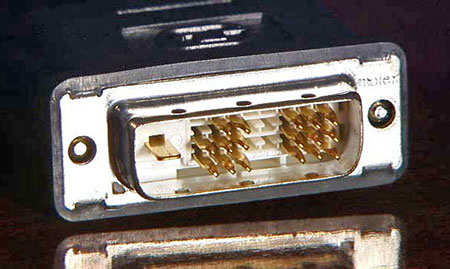
Here is an example of a DVI-D single link connector
DVI Interface
DVI is an acronym for Digital Visual Interface. Revision 1.0 of the DVI standard was issued by the DDWG (Digital Display Working Group) April 2, 1999. The spec was primarily focused at providing a digital connection between a computer and its display device. The interface was designed to support "QXGA" computer monitor resolutions of 2048x1536 at 75 Hz. The spec also makes specific reference to HDTV resolutions of 1920x1080 at 60 Hz, which would be 1080p.
There are several flavors of DVI, but the most important one, as it relates to HDTV, is the DVI-D version. It may be implemented as either single link or dual link. The DVI-D single link connector has 19 pins - two 3x3 groups of 9 with a flat pin at the side. This configuration supports digital video with a video pixel rate of up to 165 MHz. Single link can support all HDTV resolutions up to 1080p.
The DVI-D dual link version has 25 pins - the pin configuration is similar to DVI-D single link with 24 pins arranged in 3 rows of 9 pins each, with a flat pin at the side. This configuration supports video pixel rates up to 330 MHz. With twice the bandwidth of a single link connection, this configuration can support all HDTV resolutions, as well high-end computer graphics and/or higher refresh rates.
In addition to digital video, the DVI specification can also handle analog signals under certain conditions. This flavor is typically referred to as DVI-I. As with DVI-D, it can be implemented as either single or dual link. The DVI-I connector has digital pins that look just like DVI-D connectors except that 4 pins are added in the area near the flat pin - 2 above the pin and 2 below. That is a total of 23 pins for DVI-I single link and 29 pins for DVI-I dual link.
Interestingly, most HDTV equipment manufacturers use a DVI-I dual link connector, even though the components typically have no analog capabilities. In most cases, the four analog pins are not even connected internally. For that matter, at the time of this writing, I have never seen a piece of HDTV gear that makes use of the second digital link either. This tends to be very confusing, but there is some logic to the idea, because it makes the equipment compatible with all types of DVI cables. So for HDTV purposes, any type of DVI cable will work, assuming that it is of a high enough quality to handle the required distance.
The maximum length for a "standard" DVI cable is 5 meters (16.4 feet), although high-performance cables can increase that limit to about 15 meters (49.2 feet). Beyond that distance, or for marginal connections, an extender must be used. For very long runs, the signal must be converted to twisted-pair, coax, or optical.
HDMI Interface
HDMI is an acronym for High-Definition Multimedia Interface. Version 1.0 of the HDMI specification was released in December of 2002, followed by version 1.1 in May of 2004, HDMI 1.2 in August of 2005, 1.3 in June of 2006, and 1.4 in May of 2009.
Like DVI-D single link, HDMI Type A versions up to 1.2a support video pixel rates up to 165 MHz. The spec was designed with HDTV in mind, so naturally, it supports all HDTV video formats up to 1080p. In addition, up to eight digital audio channels are supported.
Although the subtle differences between the various HDMI specifications are rather entailed, actual usage is much simpler. Because only one flavor of connector is currently in wide use, if one has two HDMI-enabled components, virtually any HDMI cable can be used to connect them. In addition, HDMI Type A is compatible with DVI-D single link using simple passive adapters and conversion cables, with the understanding that the special features of each format are not supported in the other. For example, an HDMI to DVI connection will not support HDMI digital audio. Likewise, a DVI to HDMI connection will not support analog video. DVI and HDMI accessories, such as switchers and splitters are compatible in the same way. For the purposes of digital video, the two interfaces are compatible.
Like the DVI spec, there are both single and dual link version of HDMI. The single link version is known as "Type A" and the dual link version is "Type B". At the time of this writing, Type B has been defined, but we have not yet seen any consumer equipment or cables that support it. HDMI "Type C" defines a miniature connector, intended for portable devices. It is mechanically smaller than the Type A connector, but electrically identical.
The HDMI 1.4 specification added a "Type D" micro connector. It too retains a 19-pin configuration, but at only 2.8mm x 6.4mm, the connector size is similar to micro USB. For practical purposes, when dealing with non-portable equipment, HDMI Type A is the main connector format that we need to be concerned with at this time. Also included in the HDMI 1.4 spec is "Type E", intended for automotive applications.
HDMI version 1.3 brought some significant improvements, not the least of which was a doubling of single-link bandwidth to 340 MHz, bringing with it support for Deep Color. This bandwidth improvement is related to the designs of the transceivers that are built into equipment, so existing cables can work fine with the new spec, although it should be noted that poor quality HDMI cables have proven to be problematic. HDMI 1.3a was released November of 2006, adding some clarifications to the specification.
The maximum length for a passive copper-based HDMI cable approaches 15 meters, although I would comment that many of the longer copper-based cables do not work with all equipment combinations. Fortunately, high-performance cables are available, and 15 meters (49.2 feet) is easily attained with good cables, assuming that one is satisfied with resolutions of 1080i or less. For very long runs, higher resolutions, and/or advanced features, a twisted-pair (Cat-5 or Cat-6) or HDMI over coax extender/balun system can be used. The one caveat here would be in the case of DVI/HDMI conversion cables. DVI is more sensitive to distance than HDMI, so a 15 meter DVI cable must be much better than a 15 meter HDMI cable in order to accomplish the same goal. As such, long cable runs should be considered from a DVI perspective if one or both pieces of equipment are connected via DVI. If the cable is good enough to handle a DVI connection, then it will easily handle HDMI over that same distance.
HDCP
No discussion about digital video would be complete without the mention of HDCP (High-bandwidth Digital Content Protection). Revision 1.00 was issued in March of 2001, Rev. 1.1 was issued in June of 2003, followed by Rev. 1.2 in June and 1.3 in December of 2006. Version 2.0 adds stronger encryption as will as a revamped key distribution and authentication scheme.
Regardless of version, the purpose remains the same - to protect audiovisual content over high-bandwidth digital interfaces, such as DVI and HDMI.
In the HDCP model, there are "Transmitters" and "Receivers". A Transmitter is any HDCP-enabled device that can emit HDCP-encoded content through an output port, such as a satellite receiver or DVD player. A Receiver is defined as an HDCP device that can receive and decrypt HDCP content through its HDCP-protected Interface ports, such as a monitor or a recording device.
Basically, a protocol is used to establish a communication path between between Transmitters and Receivers. The Receiver must respond to the Transmitter in a way that demonstrates that it is authorized to receive HDCP content. This response is in the form of a set of secret device keys that are unique to each HDCP device.
The HDCP specification is complicated, but the result is simple: If you have an HDCP-enabled source component, every active device that connects to that source must also be HDCP-enabled. That includes switchers, splitters, monitors, projectors, recorders, or anything else that could "Receive" the signal. If the "Transmitter" doesn't get the response it wants, it will refuse to transmit the signal.
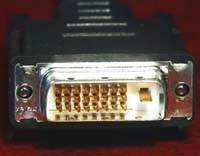
Shown here is a DVI-D dual-link connector
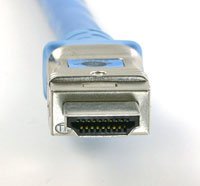
This example shows an HDMI Type A connector.